Claude Skills: How to Build Your AI Marketing Team (Part 3)
Apr 04, 2026
SKILLS: Claude Set Up Part 3
The feature that turns Claude from a generalist into your specialist
In Part 1, I covered how Claude is different to ChatGPT. In Part 2, we walked through the 10 features that turn Claude from a chatbot into a CEO-level thinker and Personal Assistant task executor.
Today, we’re stepping through SKILLS and how you can build once so you don’t have to keep briefing Claude each time you do a repetitive task.
What’s a skill?
A skill is a set of instructions you give Claude for a specific job.
Think of it like a playbook, a template, or a standard operating procedure (SOP).
Without one, Claude’s a brilliant generalist. It can do a lot, but it’s starting from scratch every time. With a skill loaded, Claude already knows the brief, the standards, the format, and the things you never want it to do.
Think of it like handing a new team member an SOP on their first day. You wouldn’t re-explain your entire process every Monday morning. You’d give them the document. Here’s how we do things. Here’s what good looks like. Here’s what we never do. Read this before you start.
That’s a skill.
Project vs Skill
A Project is like a folder. Everything inside it stays contained and organised in one place.
You might have one Project for your main business (I have one set up as my “Business Bestie”, my Business and Brand DNA files, and my go-to resources). You might set up a separate Project for each client. Or a Project for a specific campaign, a department, or a side project that needs its own space.
Whatever you put inside a Project, Claude remembers for every conversation within it. Your Business DNA, your Brand DNA, your custom instructions, your reference documents. But it only knows what you’ve given it. If you haven’t loaded a Project with files and custom instructions then it’s just an empty folder waiting to be filled. Refer to Part 1 and Part 2 for more details on Projects.
A skill is different. A skill tells Claude how to do a specific job.
Your Project is the context. Your skill is the playbook. One knows who you are. The other knows how you want the work done.
What happens when Claude knows your business AND your playbook
I’ve built two diagnostic AI tools that help you create what I call your Business DNA and your Brand DNA. Your Business DNA captures a detailed analysis of your business, including your audience, your offers, your revenue model, your positioning, and your goals. Your Brand DNA captures your voice, your values, your visual identity, and your content rules. Together, they’re the intelligence layer that tells Claude exactly who you are and how your business operates.
When those DNA files are loaded into your Project, and you’ve built specific skills for specific repeatable tasks, Claude isn’t guessing anymore. It becomes your best worker. It writes like you and dramatically speeds up every task. And now it knows exactly how you want each job done. Then it can become a powerful AI marketing team.
Skills are how you build that team inside Claude. Each skill is a team member with a specific job, trained on your business, your voice, and your standards. You’re not hiring a team of eight. You’re building one.

How do you actually use a skill?
This is the question I get asked most. Do you have to upload it every time? Do you have to tell Claude which skill to use?
No and no.
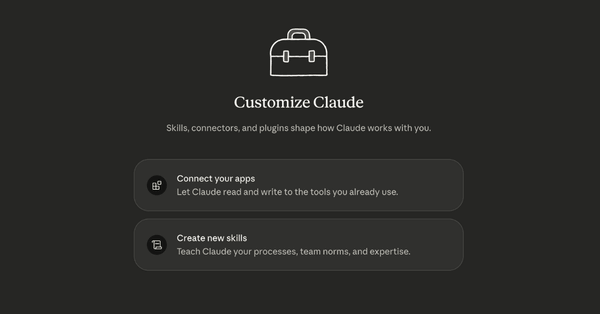
Once you’ve built or installed a skill and toggled it on in Customize > Skills, it stays on. You don’t touch it again. You just ask Claude to do the task like you normally would.
Claude reads the description of every skill you’ve got switched on. When your request matches what a skill is designed for, Claude activates it automatically. You don’t need to mention the skill by name. You don’t need to upload anything. You just say “write me a follow-up email” and if you’ve got an email skill toggled on, Claude uses it.
In Cowork, you’ve also got the option to type / and see a list of your available skills. You can pick one directly from the list if you want to trigger a specific skill on purpose. But most of the time, Claude just picks the right one on its own.
Does having 20 or 30 skills toggled on slow Claude down? No, it only reads the short description of each skill to decide if it’s relevant. The full instructions only load when Claude actually needs that skill for your task. So the more you build, the smarter Claude gets.
Do skills work in both Chat and Cowork?
Yes. Your skills are managed in the same place for both: Customize > Skills. Build a skill in Chat and it’s available in Cowork. Build one in Cowork and it’s available in Chat. You’re not maintaining two separate libraries.
The difference is what Claude can do with the skill once it’s activated.
In Chat, Claude reads the skill and follows the instructions inside the conversation. It can’t touch your files or run anything on your computer. It’s instructions only. But it works, and for most people starting out this is a powerful business tool.
In Cowork, Claude can actually do things with your files. A skill in Cowork can tell Claude how to process a document, what to create, where to save it, and how to check its own work before handing it back. Same skill, but now it’s got hands.
I’ll cover how Cowork works in more detail in the next article, so be sure to subscribe.
Subscribe now
The skills every small business owner needs
Start with the skills that match the tasks you repeat every week.
-
A brand voice skill so Claude stops sounding like AI and starts sounding like you
-
A content planning skill that takes one topic and maps a full month of content across your platforms
-
An email skill that knows how you open, close, and write every email
Build these three and your weekly workflow changes permanently.
How to build your own
You don’t need to be technical. Claude has a built-in Skill Creator that does most of the heavy lifting for you.
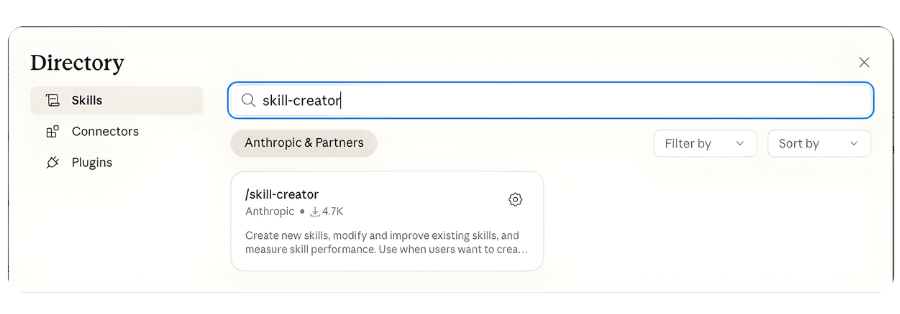
The quick way: Go to Customize, then Skills. Enable the Skill-Creator skill (it’s one of Claude’s built-in ones). Then just describe the task you want a skill for. “I need a skill that writes my weekly email newsletter in my voice, using this structure, with these rules.” Claude builds the skill file for you. You review it, tweak it, save it. Done.
If you want to build one manually, a skill is a text file with a .md extension. You can write one in any text editor. Once it's ready, package the folder as a ZIP file and upload it via Customize > Skills.
Here’s what goes in it.
Give it a name and a description. The description is what tells Claude when to use it. “Use this skill when writing follow-up emails after a discovery call” is specific and useful. “Email skill” isn’t.
Define the task. What’s Claude doing? What does the finished output look like?
Set your standards. Format, tone, length, structure. If you’ve got a template you already use, describe it.
Write your hard nos. What should Claude never do when this skill is active? What words, phrases, or approaches are off limits? This is often the most valuable section.
Include an example. One piece of output that nails the voice and format. A concrete example teaches Claude more than three paragraphs of explanation.
Are Claude Skills Safe? What to Check Before You Install
This matters. And I’m not being dramatic.
In early 2026, security researchers conducted a full audit of nearly 4,000 skills on one open skill marketplace and found that over 500 contained critical security issues, with 76 confirmed to contain malicious code designed to steal credentials and data. These weren't sophisticated hacks. They were professional-looking skills with clean documentation that tricked users into installing malware. The attack worked because people trusted the marketplace and didn't read the files before installing.
That’s the reality. And it’s why I want you to be careful about every influencer online telling you to “download my free skills pack.” Many of those skills are also just generic. They sound impressive but they’re built for everyone, which means they’re built for no one. A generic “LinkedIn post writer” skill doesn’t know your voice, your audience, or your offers. It’s going to produce the same bland output it produces for everyone else. The whole point of a skill is that it’s built for your business. If it isn’t, it’s not adding the value you think it is.
The skills I share inside Content Catalyst are ones I’ve personally built, tested, and use in my own and my clients’ businesses every day. I’ve spent the past two years building an AI Marketing Team for business owners based on my 30 years marketing experience and the best practices for each specific task. They started as Custom GPTs, and I’ve since upgraded and powered them up specifically for the Claude platform, adapted as proper Skills with better structure, security best practices, and workflows designed for business owners like you. These aren’t generic downloads. They’re tools I trust with my own business and my clients’ businesses.

That said, here’s what to check before you install anything from anyone else.
Does it match the description? If someone says it’s a “content planner” but the file contains instructions to visit external URLs or access your email, that’s a red flag.
Does it ask Claude to go to websites you don’t recognise? Some skills legitimately fetch information from the web. But a writing skill shouldn’t be sending Claude to random URLs.
Does it ask Claude to run code or commands? In Cowork, Claude can execute commands on your computer. A writing skill or planning skill shouldn’t need to run shell commands. If it does, you need to understand exactly what those commands do before you use it.
Who built it? A skill from Anthropic’s official marketplace or a verified creator is different to a file someone shared in a Facebook group. If you can’t verify who built it, read the file twice.
The short version: open it, read it, understand it. If you can’t read it or don’t understand what it’s doing, don’t install it. It’s your computer, your data, and your business.
Want to build skills for your business with support?
Right now inside Content Catalyst, we’re working through setting up Claude for business. Step by step. Live. Together.
Get a real marketing team for your business. A content engine handling your long-form writing, social media planning, video scripting, and repurposing. That’s your visibility squad. Then turn that visibility into revenue: your launch strategist, your email sequence writer, your website copywriter, your SEO and AEO specialist, your ad strategist, your proposal writer. That’s your revenue squad.
Not theory. Not “go figure it out.” We’re building your essential setup, your Skills, your Business Bestie, and your content pipeline in real time across our live sessions.
This month I’m sharing our AI Marketing Team skills inside the membership. These are the ones that help with content visibility and lead generation.
If you’ve been reading this series thinking “I want this but I don’t want to do it alone,” this is your window.
If you want support building this for your business, explore Content Catalyst.

Subscribe to this Newsletter By Deb Szabo to move beyond prompts and install the systems that build brand and drive revenue.
Deb Szabo brings 30 years in marketing to practical AI implementation. She is an AI Business Strategist and Claude Specialist who installs an AI Brain for Business and practical AI systems using the knowledge already inside a business. She passed Claude Certified Associate - Foundations and is registered in the Claude Partner Network.
Read the current Claude setup and training guide for Australian businesses.
Get practical AI ideas for your business
Join Deb Szabo's weekly AI for Business Growth newsletter for practical ways to use Claude and AI across your business.
We hate SPAM. We will never sell your information, for any reason.