
Why You Keep Hitting Your Claude Usage Limit (And the 7 Habits That Fix It)
May 10, 2026
Plus a free prompt to save usage
You sat down at 9am and opened Claude to brainstorm your next offer. The conversation was flowing. Claude was on it.
You nailed the offer. So you stayed in the same chat to write the website copy, then the email sequence, then the blog. And before you know it, Claude is sorting what to make for dinner.
Then it happened.
You’ve reached your usage limit. Try again at 7pm.
But you finally upgraded from free Claude to Pro.
How is this possible?
You sat there staring at the screen. You just upgraded. You’re on the paid plan.
This is the moment most people get annoyed and think…ChatGPT never did this and what the hell is a token anyway?
Here’s where I hold your hand and tell you openly, Claude is different. It's a powerful AI for nuanced reasoning, long-document analysis, and following complex instructions but you have to work with it differently.
So let’s break down how to optimise our usage and our workflow to get more from your Pro plan.
What this article covers
This is Part 5 of my Setting Up Claude series. Parts 1 to 4 walked you through the features that turn Claude from a chatbot into a full AI team that will actually do the task for you.
-
Part 1: Claude Is Not ChatGPT. Why Claude works differently and how to migrate without dragging your ChatGPT habits with you.
-
Part 2: Ten Essentials to Set Claude Up. The ten foundational features that turn Claude from a chatbot into a CEO-level thinker and your personal assistant.
-
Part 3: Build Skills So Claude Thinks Like You. What Skills are and how they automate your repeat tasks.
-
Part 4: Turn Claude Into Your Personal Assistant with Connectors. How Connectors plug Claude into the tools you already use so you stop chatting and start delegating.
Today we fix the thing nobody warned you about. The reason Claude goes from omg best AI ever on Monday to arh I hate you, I’m locked out by Wednesday afternoon.
You’re going to walk away knowing exactly why your usage burns so fast, the seven habits that fix it, and a free prompt at the end you can copy and use today to save your usage.
Why Does Claude Run Out Faster Than ChatGPT?
Because Claude remembers everything.
Every message you send, every reply Claude gives, the whole conversation stays loaded in the active window. That’s why it understands your context so well and gives you the depth and nuance.
ChatGPT works differently. It uses a sliding window. As your conversation gets longer, it quietly drops earlier parts to keep things moving. That’s why long ChatGPT conversations start to drift. It forgot what you said an hour ago.
Claude doesn’t drift. It remembers. But that memory has a cost. It’s called tokens.
What Is a Token in Claude?
A token is a tiny chunk of text. Roughly three-quarters of a word.
Every time you use Claude, you’re paying in tokens, not messages. Your prompt counts. Your uploaded files count. Your active Connectors count. Claude’s reply counts. All of it gets tallied against a rolling usage budget that runs across Chat, Cowork, and Code.
Think of it like a fuel tank. You can drive a long way on a full tank if you’re efficient. Or you can run it dry by lunchtime if you’re flooring the accelerator at every traffic light.
Hit the limit and Claude slows down or locks you out until the window resets.
Why Does Claude Run Out of Tokens So Fast?
Because Claude re-reads the entire conversation every single time you hit send.
Your first message in a fresh chat costs almost nothing. Your tenth message costs ten times as much, because Claude is re-reading all nine previous exchanges before it even gets to your new question. By message 30, you’re paying tokens to reprocess the whole thing thirty times over.
In long sessions, the vast majority of token usage in long sessions is just re-reading conversation history.
So look back at that chat. You brainstormed an offer, website copy, emails, blogs and a chicken curry recipe. That’s not one conversation. That’s five different jobs, all stacked into the same chat window. Every time you hit send, Claude was re-reading the entire morning before getting to your new question.
You weren’t using Claude. You were dragging the whole morning behind you on every prompt.
This is the thing nobody warned you about when you upgraded.
Context is currency.
Lean context = fast Claude, cheap Claude, sharp Claude.
Bloated context = slow Claude, expensive Claude, wandering Claude.
“Lean context” just means the conversation is short, relevant, and focused. Claude only has a little bit to re-read. So it responds faster, uses fewer tokens, and stays on point.
“Bloated context” means the conversation has gotten long, messy, or full of stuff that isn’t relevant anymore. Claude has to wade through all of it before every reply. So it gets slower, more expensive to run, and starts giving vague, unfocused answers.
Think of it like your desk.
Clean desk. You find what you need fast. You think clearly. You execute well.
Buried desk. You waste time digging. You lose focus. You make mistakes.
Claude’s “desk” is the chat window. Your job is to keep it tidy.
7 habits that save your Claude tokens
Ranked by impact. The first three are the heavy hitters that drop your usage dramatically. The rest compound the savings.
1. Start a New Chat in Claude
New task = new chat. Same task continuing = same chat.
Switching from drafting an email to planning your content for the month to figuring out what to call your next podcast episode? That’s three chats. Not one.
This habit alone will halve your usage. But I have all this great information inside this chat that I don’t want to lose! I hear you. At the end of this article I’ll share a prompt that will help transition your workflow so you don’t have to re-explain everything you’ve worked on so far.
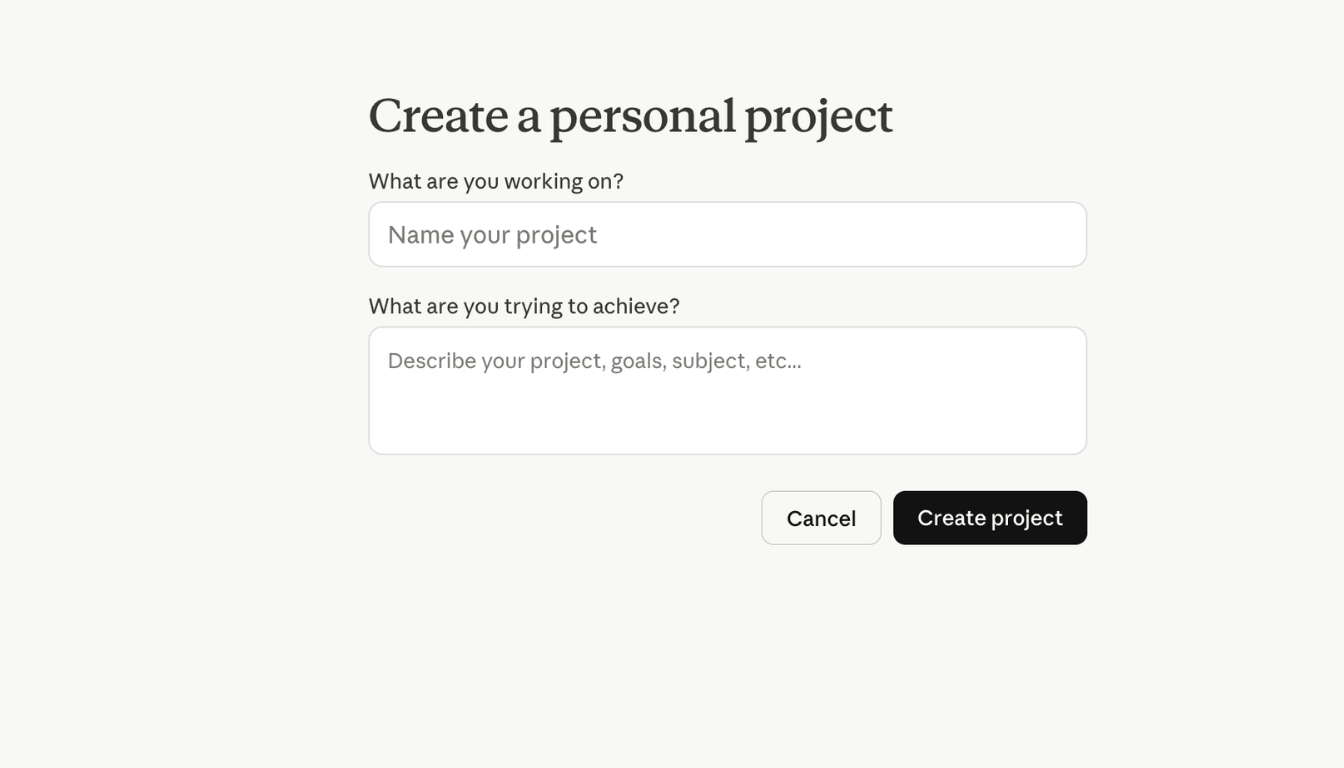
2. Use Projects in Claude
Create a Project that holds all your business information so you stop having to re-upload the same files and backstory every time. The Project is the memory. Chats are the conversation.
Drop your Business files into a Project once. Every new chat inside that Project starts pre-loaded. You don’t pay to re-explain who you are at the start of every single conversation
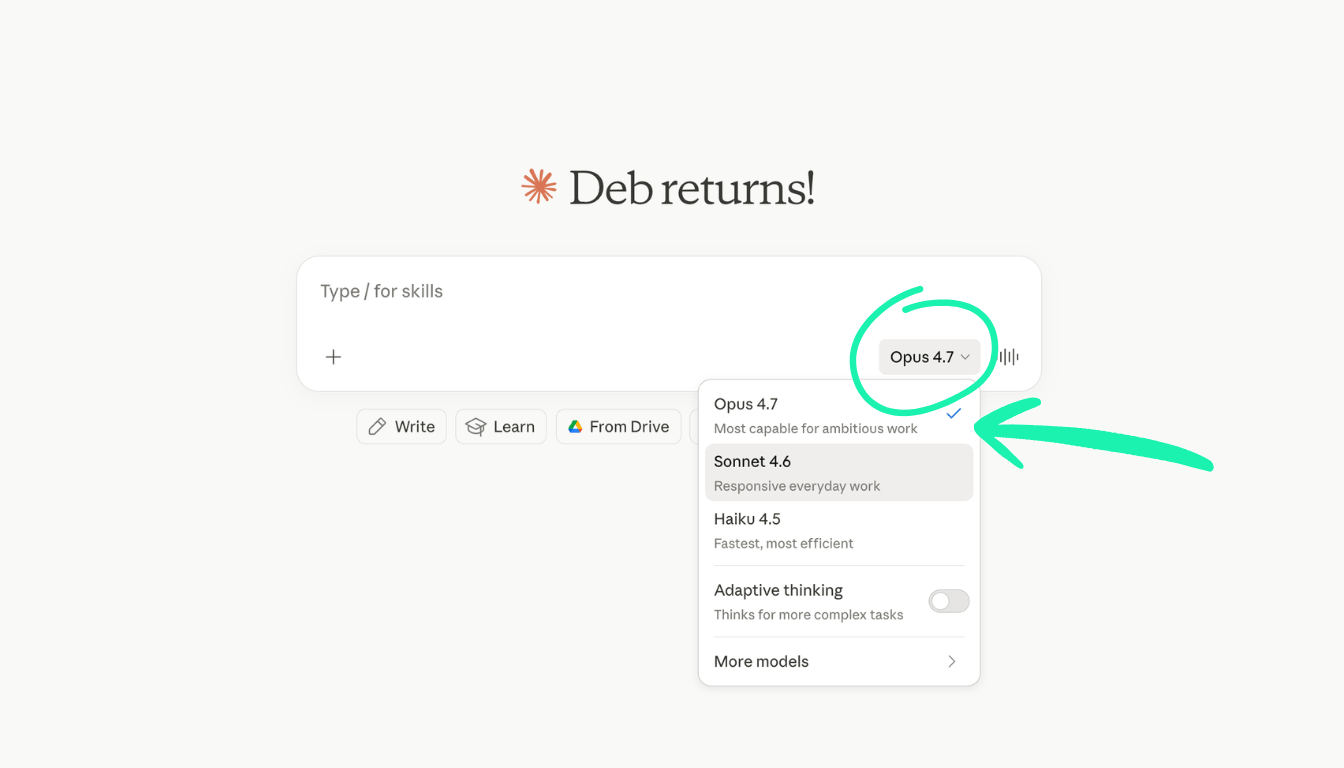
3. Know Which Claude Model to Use
Match the model to the task. This is the highest-leverage change you can make and it takes two seconds.
Claude gives you three models. Each one consumes your usage limit at a different rate. Same conversation. Same length. Different cost.
Haiku is fast and cheap. Use it for quick tasks like simple list generation, formatting, or “I need a recipe for chicken curry.”
Sonnet is your everyday default. It handles 80% of real work. Email drafts, caption writing, content planning conversations. Sonnet costs roughly 3x more per token than Haiku.
Opus is the heavy lifter. Crunching complex data, deep strategy sessions, big-picture planning that affects revenue, critical decisions where nuance matters. Opus costs roughly 5x more than Haiku.
Running Opus on autopilot all day for emails and captions is the fastest way to drain your limit before lunchtime. Opus is often set as the default so check which model you’re on before you begin your conversation
4. Edit the Prompt in Claude
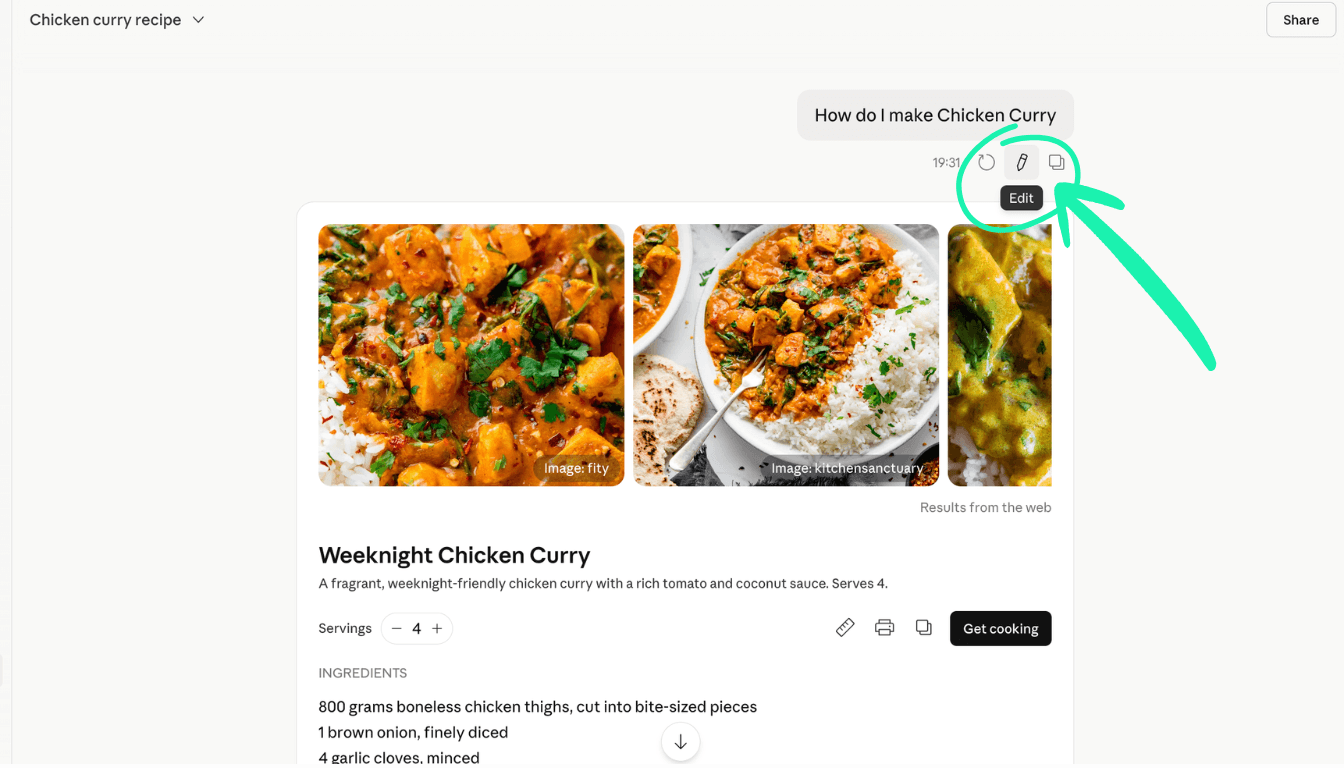
When Claude misses, your instinct is to type “no, try again” or “actually I meant Y.” Every follow-up keeps the bad answer AND the correction in context. You pay for both forever.
Instead, edit the original message. Hit the pencil icon, refine the question, resend. The bad branch evaporates. Token count resets to that point.
The most underused button in the whole interface
5. Build a Skill in Claude
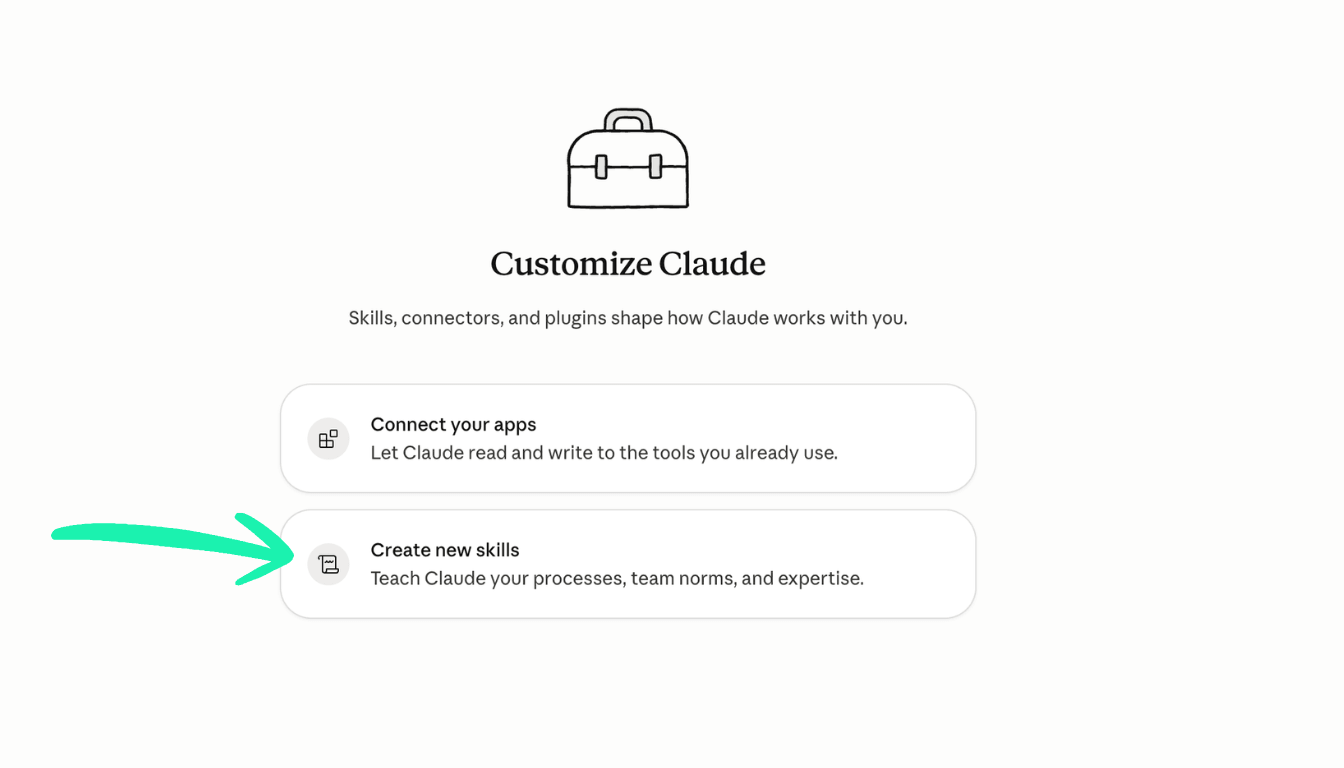
If you’ll do something more than twice, build a Skill.
Writing “use my voice, no em dashes, UK English, mint only on dark backgrounds” every time you start a task means you’re paying for those instructions on repeat. A Skill stores those instructions once and triggers by keyword. No token cost to invoke.
The full Skills walkthrough is Part 3 of this series
6. When to Use Cowork
Cowork uses more tokens than Chat by design.
Cowork is built for chunky multi-step builds. It reads more files, runs more steps, and uses more tokens per task. One bloated Cowork session can chew through what would be a week of Chat work.
Use Cowork for build days. Mapping offers. Auditing funnels. Building campaign assets. Full sales page rewrites. For quick emails, planning or brain dump sessions, stay in Chat.
7. Turn Off Connectors in Claude
Treat your Connectors like meeting attendees.
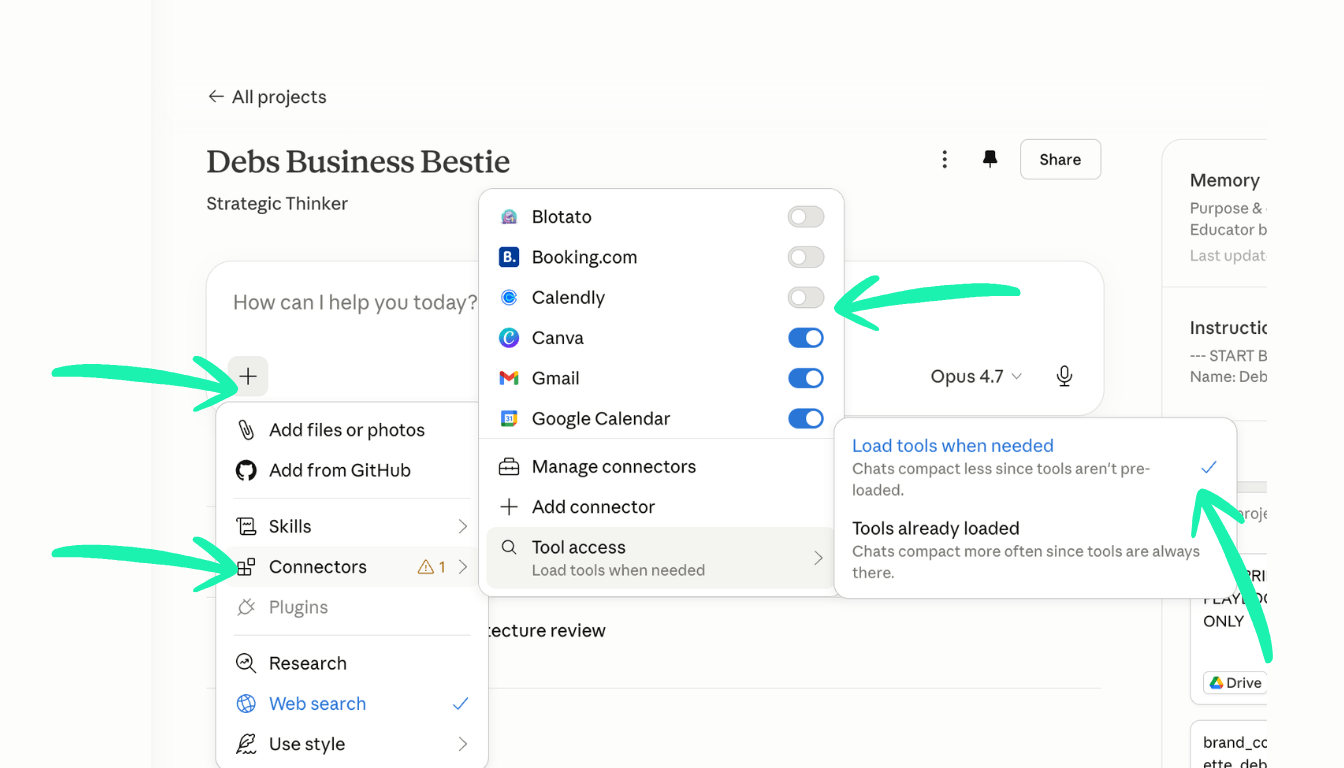
Each active Connector loads its description and metadata into context, costing tokens before you’ve even started the real work. Only switch on what you need for that conversation. Keep tool behaviour set to “Load when needed.”
It’s tempting to link as many Connectors as you can. Don’t. Switch off any you’re not using in the thread to keep your context clean.
The full Connectors setup is Part 4 of this series.
How Do I Check My Claude Usage?
Go to Settings → Usage. Here you can see your session and weekly usage, how much of your rolling limit you’ve used, and when it resets.
Bookmark it. Check it before you start a heavy build. It’ll change how you work.
If you’re hitting limits regularly, the culprit is almost always one of three things: a handful of bloated Cowork sessions, marathon chats running all day, or Opus running on autopilot for tasks Sonnet would handle just as well.
Frequently Asked Questions
Which Claude model should I use every day? Sonnet for the vast majority of your work. Step up to Opus only when the task involves complex strategy, revenue-critical decisions, or nuanced frameworks where depth genuinely matters. Check your model before every session. It often defaults to Opus.
Does starting a new chat really save that many tokens? Yes. By message 30, roughly 98% of your token usage is re-reading history, not generating new output. A new chat resets the meter completely.
What is a token limit in Claude? Your token limit is a rolling usage budget that resets on a set schedule. It counts every word in: your prompts, uploaded files, active Connector metadata, and Claude’s replies. Hit the limit and Claude slows down or locks you out until the window resets.
What’s the fastest way to stop hitting my Claude limit? Three changes fix most of it immediately: switch from Opus to Sonnet for everyday tasks, start a new chat for each new task, and close Cowork sessions when the project is done.
Free Prompt to Save Your Usage
In Habit 1 we talked about starting a new chat for each task. But what if you’re deep in discussion with Claude, the ideas are on point, and you don’t want to start a new chat and explain everything all over again? I hear you.
So when a chat hits 30+ messages and the output is gold but the chat is now bloated, here’s the fix. It’s what I call Freeze and Fork.
Stop. Ask Claude for a clean Handoff Brief. Save it, start a new chat, and paste it in. The new chat will pick up exactly where you left off.
If you just ask for “Handoff Brief” it will give a nice summary. But I don’t want you to miss any context from that conversation you’ve just had. Instead, copy this prompt and use it the next time a chat goes long:
Give me a clean handoff brief I can paste into a new chat.
Structure it as:

1. Locked decisions (what we've agreed on)
2. Open decisions (what's still in play)
3. Files created (with locations)
4. Next 3 actions (what I'm doing next)
5. Voice and brand context (how I write, what I stand for,
what to avoid)

Keep it tight. No preamble. No filler.
Save this prompt somewhere you can grab it fast. It’s the difference between losing a great session and carrying it forward cleanly.
Want to install all of this properly?
This is one piece of a much bigger system.
Content Catalyst is my online community for solo operators and lean teams installing AI properly into their business.
Most AI prompts and skills you’ll find are generic. Built for everyone, tailored for no one. That’s why they don’t move the needle.
Inside Content Catalyst, everything is tailored to your business. Step by step, you build your AI Brain (the customised intelligence layer about your business, brand, content, and voice) and I hand you the strategy, systems, skills, workflows, and automations that take the tedious tasks off your plate so you can focus on what matters most. Connecting with your clients. While Claude does the business, operations, and marketing admin. From production to customer journey, lead generation, sales, and content.
Your business. Transferable to any industry.
AI made easy. Hours saved every week. Real revenue made.
Templates, live coaching, and a community of business owners building alongside you. Updated weekly as AI moves fast.
AI is not the strategy. It is the accelerator. But only if you’re driving it efficiently with strategy and systems

Deb Szabo brings 30 years in marketing to practical AI implementation. She is an AI Business Strategist and Claude Specialist who installs an AI Brain for Business and practical AI systems using the knowledge already inside a business. She passed Claude Certified Associate - Foundations and is registered in the Claude Partner Network.
Read the current Claude setup and training guide for Australian businesses.
Get practical AI ideas for your business
Join Deb Szabo's weekly AI for Business Growth newsletter for practical ways to use Claude and AI across your business.
We hate SPAM. We will never sell your information, for any reason.